|
|
 SnG Experiment - Overview and File Saving Instructions SnG Experiment - Overview and File Saving Instructions
PLEASE READ EVERYTHING BEFORE THE EXPERIMENT BEGINS.
ABOUT THE SNG EXPERIMENTS
The SnG experiments are SnGs in which only FTR members play. Each member notes down comments throughout the SnG, and then all of the hands, hole cards, and comments are combined and posted on FTR. This allows FTR members to read the thought processes of other members for each hand.
ABOUT THE SCRIPT
An AHK script will now be used to combine the hands and comments, so a few rules need to be followed to make it work properly. Please follow these rules, as it will only take around ten minutes of your time after the experiment is over. By not following the rules, somebody will have to manually trawl through all of the files, which takes a lot of time. This may result in the SnG experiments being cancelled.
CHECK YOUR SETTINGS ON POKER STARS
Make sure your Hand Histories are being saved to your hard drive. This is done by following the steps below.
Poker Stars Lobby -> Options -> Instant Hand History Options
Make sure the following box is ticked:
Save My Hands History
FILES REQUIRED
After the SnG is over, each person will need to submit two files, one containing the hand history (HH), and one containing the comments. Both of these files need to be in plain text format, so using Notepad is probably the easiest.
Please use your poker screen name for naming the files, and NOT your FTR name, as the script needs to use your screen name to work out the seat positions. The script will automatically convert your poker screen name to your FTR name.
Example: If your poker screen name is MrGoodPlayer, the two files you need to submit are:
MrGoodPlayer_HH.txt
MrGoodPlayer_comments.txt
CREATING THE HH (HAND HISTORY) FILE
This part is easy. Just resave your hand history file and give it the required name.
CREATING THE COMMENTS FILE – SUGGESTED METHOD
Comments can be added to as many or as few hands as you like, but please make sure they are listed in the correct order. For example, if you make comments on Hands 2, 12, 25, and 78, make sure they are listed in this order in the comments file.
The comments file needs to be in a certain format, so the script can recognise and pull out each comment. I think the easiest way to create your comments file is to open a new Notepad document at the start of the SnG, and if you want to make a comment on a particular hand, write down your hole cards and comments for that hand, in the Notepad file.
You need to enclose your comments for each hand with carets (^). This is very important, as it allows the script to recognise that a comment is a comment. You can do this as you go, or edit the comments file after the SnG is over, adding the carets to all your comments. An example may be...
Ts Jd
^The table was playing tight enough for me to raise this one up.^
Then, after the SnG is over, you need to look through your HH file, find the hand in question, and replace your noted down hole cards with the corresponding Game (hand) number. As an example, the Ts Jd hand may be represented in the HH file by…
PokerStars Game #18357795489: Tournament #92980646, $5.00+$0.50 Hold'em No Limit - Level IV (50/100) - 2008/06/24 - 16:52:12 (ET)
So, for the above example, you would end up with…
PokerStars Game #18357795489: Tournament #92980646, $5.00+$0.50 Hold'em No Limit - Level IV (50/100) - 2008/06/24 - 16:52:12 (ET)
^The table was playing tight enough for me to raise this one up.^
ADDING PRE-GAME COMMENTS
These comments can be added to show your thoughts before the SnG starts. If you are adding a Pre-Game comment, please make sure this comment goes above all other comments. To add a Pre-Game comment, please paste the following line above the comment:
Game #Pre
Again, the comments need to be enclosed with carets (^), e.g.
Game #Pre
^ This is my first SNG experiment so I'm planning to start slowly and see what happens.^
ADDING CLOSING COMMENTS
These comments can be added to show your thoughts after the SnG has ended. If you are adding a Closing comment, please make sure this comment goes below all other comments. To add a Closing comment, please paste the following line above the comment:
Game #Closing
Again, the comments need to be enclosed with carets (^), e.g.
Game #Closing
^I really enjoyed this experiment, but I think I played too tight overall.^
MENTIONING OTHER PLAYERS IN YOUR COMMENTS
If you want to mention other players in your comments, please use their full poker screen name. For example, if you wanted to mention MrGoodPlayer, please write a comment like…
^MrGoodPlayer has been raising a lot lately^
Shortening a name will result in the script not recognising it. So, something like the following will not get picked up and converted…
^MrGoody has been raising a lot lately^
EXAMPLE COMMENTS FILE
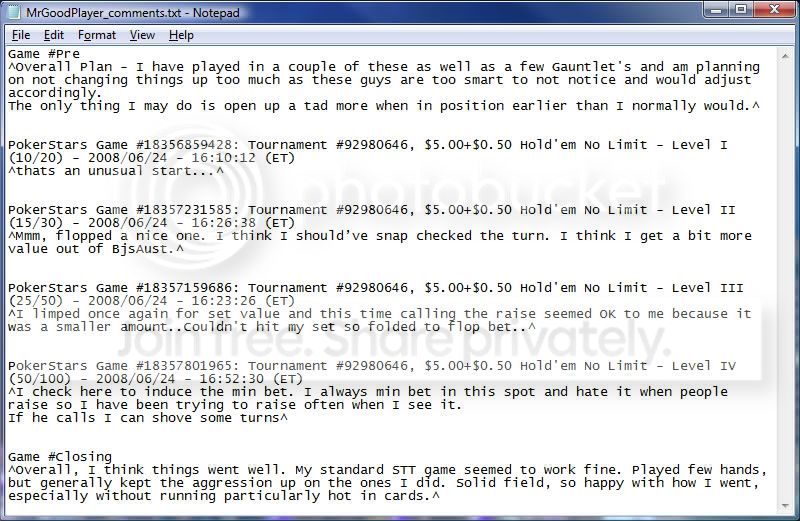
|




 Reply With Quote